A slow site rarely announces itself. You open it on the office Wi-Fi, it looks fine, and you move on. Meanwhile a customer standing in a parking lot on one bar of signal taps your listing, watches a blank white screen, and goes back to the search results. You never see that visit. You just see fewer calls than you expected.
This guide covers how Google measures speed, what a slow page is likely costing you, the usual causes, and the order to fix them in. Most of it you can check yourself in an afternoon.
How slow is too slow? Google’s Core Web Vitals
Google does not grade speed on a single stopwatch number. It uses three metrics called Core Web Vitals, measured from real Chrome users visiting your site. Each has a published “good” threshold.
Largest Contentful Paint (LCP) is the one most small-business sites fail. If your homepage banner is a 3 MB photo, LCP waits for that photo. Interaction to Next Paint (INP) replaced First Input Delay as a Core Web Vital in March 2024. It looks at responsiveness across the whole visit, so a laggy menu or a form that freezes while a script runs drags it down. Cumulative Layout Shift (CLS) catches the page that moves under your thumb when a late image or banner pushes the content down, so you tap the wrong thing.
Google says it uses Core Web Vitals in its ranking systems, and also says that great page experience does not outrank relevant content. In plain terms: speed will not rescue a page that does not answer the search, but between two decent local pages, the fast one has the edge. The bigger effect is on the people who do arrive.
What a slow website costs you
Speed is a conversion problem before it is an SEO problem. A visitor who leaves during a blank screen does not fill out your form, and you cannot win that visit back with better copy because they never saw the copy.
Here is a simple way to think about it (illustrative numbers, not a benchmark). Say your site gets 1,000 visitors a month and 3 percent of them contact you. That is 30 leads. If a slow homepage cuts that conversion rate to 1.5 percent, you get 15 leads from the same traffic. You lost half your inquiries without changing a word on the page.
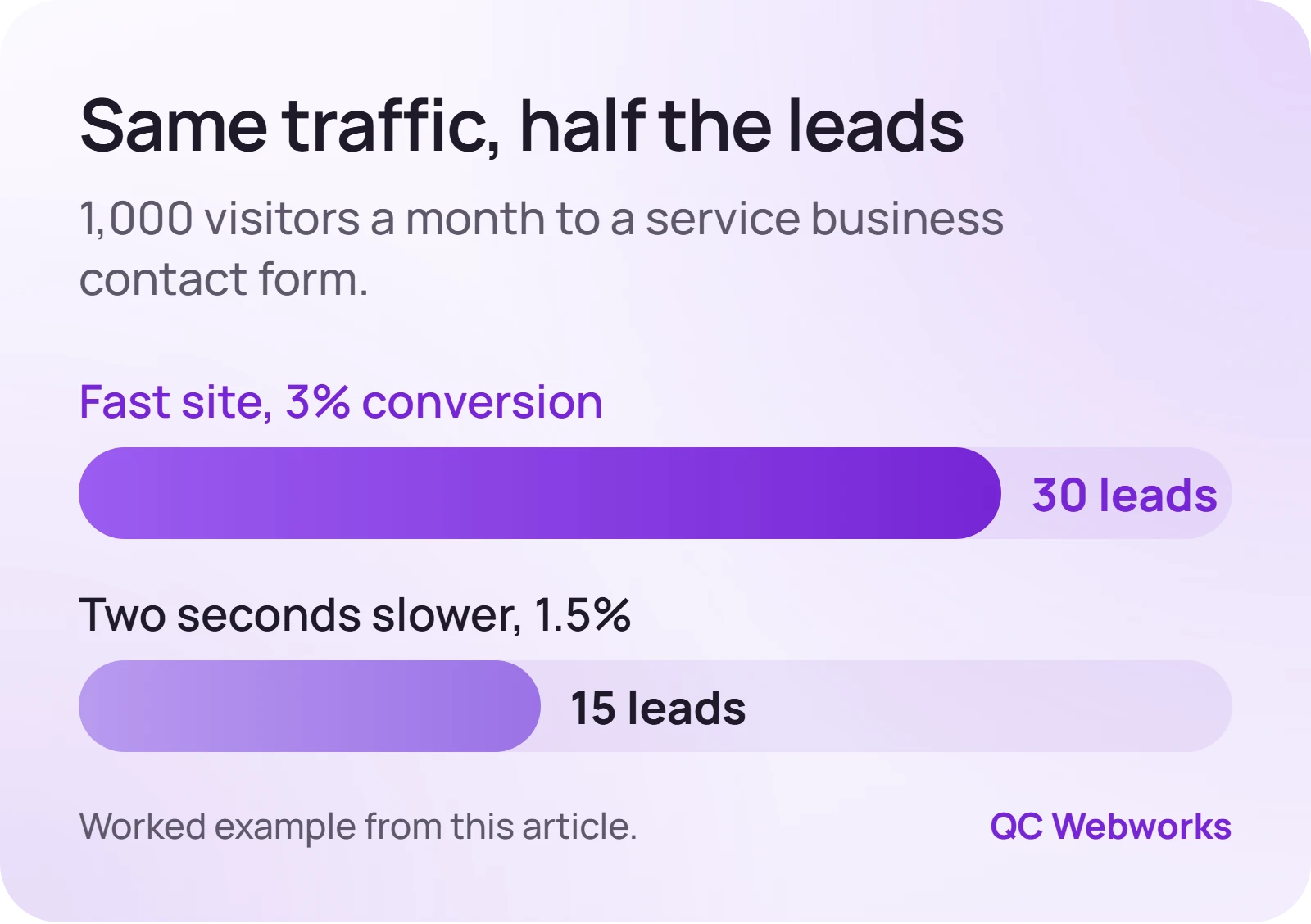
Your real numbers will differ. The point of the exercise is that the cost of slowness scales with your traffic and your average job value. For a contractor whose typical job is a few thousand dollars, even two or three lost inquiries a month is a meaningful number. Mobile matters most here: people searching for a local service on a phone are often ready to call right now, and they are also the visitors on the slowest connections.

Why is my website slow? The usual causes
Most slow sites do not have one catastrophic problem. They have five small ones stacked on top of each other.
Oversized images
This is the most common culprit by a wide margin. A photo straight off a modern phone or camera can be several megabytes. Put three of those on a homepage and the browser has to download a small video’s worth of data before the page looks finished. Every image should be resized to the largest size it is actually displayed at, compressed, and served in a modern format like WebP or AVIF.
Too many plugins and third-party scripts
Each WordPress plugin can add its own CSS and JavaScript files to every page, whether that page uses the feature or not. Add a chat widget, a review carousel, two analytics tags, a heat-mapping tool and a social feed, and the browser is busy running other companies’ code before it gets to yours. This is also the main reason INP scores go bad.
Heavy themes and page builders
Multipurpose themes and drag-and-drop builders ship code for hundreds of layouts you will never use. They are convenient, and they can be made fast, but out of the box they often produce bloated pages. We wrote a separate piece on why Elementor sites get slow and what to do about it.
Cheap or overloaded hosting
Bargain shared hosting puts your site on a server with many others. If the server is slow to respond, everything after it is slow too. PageSpeed Insights flags this as a slow server response time (sometimes shown as Time to First Byte).
No caching, and render-blocking files
Without page caching, WordPress rebuilds each page from the database for every visitor. And when CSS and JavaScript files load in the wrong order, the browser waits for them before showing anything at all, even if the content itself is light.
Before you change anything, run this quick diagnosis so you fix the right thing first.
- Test three pages, not one. Run your homepage, your most important service page and your contact page through PageSpeed Insights, and read the mobile results.
- Look at field data first. The “Discover what your real users are experiencing” section shows Core Web Vitals from real visitors. If your site has too little traffic for field data, use the lab results below it.
- Find the LCP element. The report names the element behind your Largest Contentful Paint. If it is an image, note its file size.
- Check server response time. If the report flags a slow initial server response, hosting or caching is part of the problem.
- List your plugins and tags. Write down every plugin, widget and tracking script, and next to each one, what business job it does. Anything without a job is a candidate for removal.
- Test on a phone, off Wi-Fi. Load the site on cellular data and time how long until you could tap the phone number.
How to improve website speed this week
You do not need a redesign to see a difference. Work through these in order, retesting after each one so you know what helped.
- Compress and resize every image
Start with the LCP image the report named. On WordPress, a tool like ShortPixel or Imagify can compress your existing library and convert to WebP automatically. Six 2 MB photos brought down to around 100 KB each is a huge reduction in what the browser downloads. You will know it worked when the LCP time in your lab test drops.
- Delete what you do not use
Deactivate and delete unused plugins, retire old tracking tags, and question every widget. For the ones you keep, check that they are maintained and updated. Our plugin cost ledger is a good way to decide which ones earn their place.
- Turn on page caching
A caching plugin such as WP Rocket or LiteSpeed Cache (if your host runs LiteSpeed) stores a ready-made copy of each page. Many managed hosts include caching already, so check before installing a second layer.
- Defer scripts that are not needed on load
Chat widgets, review feeds and similar extras can usually load after the main content. Most caching plugins have a setting to delay JavaScript. Test your forms and menus afterward, because aggressive delaying can break them.
- Talk to your host
If server response time is still slow after caching, ask your host what plan you are on and what managed WordPress hosting would cost. The difference between a crowded shared server and a decent managed plan is often obvious in the very first test.
Back up first. Image optimization, caching and script-delay settings can break layouts or forms. Take a backup and test the contact form after every change, not just at the end.
When the fix is bigger than a plugin
Sometimes the tune-up gets you most of the way and sometimes it does not. Use the test results to decide what kind of problem you have.
If LCP is slow and the LCP element is a large image
Then it is an image problem. Resize, compress and stop lazy-loading that one hero image. This is usually a one-hour fix.
If server response time is slow even with caching on
Then it is a hosting problem. Move to a better plan or host before spending money on anything else.
If INP is poor and the report lists long JavaScript tasks
Then it is a script problem. Remove or delay third-party tools and review heavy plugins one at a time.
If every page is heavy because of the theme or builder itself
Then patching has limits. A leaner template or a rebuild of the key pages may cost less over time than fighting the theme.
If you would rather hand it off, our website and SEO audit ($349) includes a speed review with the specific bottlenecks ranked by impact, and our maintenance service keeps images, plugins and updates from drifting back. For the phone side of the problem, see why phone visitors leave.
Frequently asked questions
Does website speed affect Google rankings?
Yes, but modestly. Google says Core Web Vitals are used by its ranking systems, and it also says relevant, helpful content matters more than page experience. Speed has a much bigger effect on what visitors do once they land.
What is a good PageSpeed Insights score?
Lighthouse treats 90 to 100 as good, 50 to 89 as needs improvement and below 50 as poor. The score is a lab estimate, though. The more useful goal is passing all three Core Web Vitals in the field data section, because that reflects real visitors.
Why is my WordPress site so slow?
Usually a combination of unoptimized images, too many plugins, a heavy theme or page builder, no caching and inexpensive shared hosting. Run PageSpeed Insights on your homepage and a service page, and the report will point to which of those is the biggest factor.
Will a caching plugin fix a slow website?
It helps with server response and repeat visits, but it will not shrink a 4 MB hero photo or remove a slow chat widget. Treat caching as one step after image and script cleanup, not a substitute for them.
How do I check my website speed for free?
Use Google PageSpeed Insights at pagespeed.web.dev. Enter the full address of each page you care about, read the mobile tab, and check the field data and the list of opportunities. Search Console also has a Core Web Vitals report for your whole site.
Sources
- web.dev: Web Vitals
- Google Search Central: Understanding Core Web Vitals and Google search results
- web.dev: Interaction to Next Paint (INP)
- Google PageSpeed Insights
Your next step is small: open PageSpeed Insights, test your homepage on mobile, and write down the LCP element it names. If it is an image, you probably know what you are fixing first.