Holiday email advice is mostly written by email platforms for online stores with a marketing team. It assumes a gift guide, an abandoned-cart flow and a promo every few days. A local shop, salon, contractor or clinic with a list of 600 customers needs something smaller: a handful of emails that answer the questions customers actually have in December, sent on dates you can put on the calendar today.
This is that plan for the 2026 season, with the dates, what each email says, subject lines that tell the truth, the inbox rules that changed in the last two years, and a way to count the results.
Holiday email marketing for a local business: the 2026 calendar
The dates that drive everything this year: Thanksgiving is Thursday, November 26. Black Friday is November 27, Small Business Saturday November 28 and Cyber Monday November 30. Christmas and New Year’s Day both fall on a Friday. If you ship anything, the USPS 2026 holiday shipping dates recommend sending Ground Advantage and First-Class Mail by December 17 and Priority Mail by December 18 for Christmas delivery in the Lower 48.
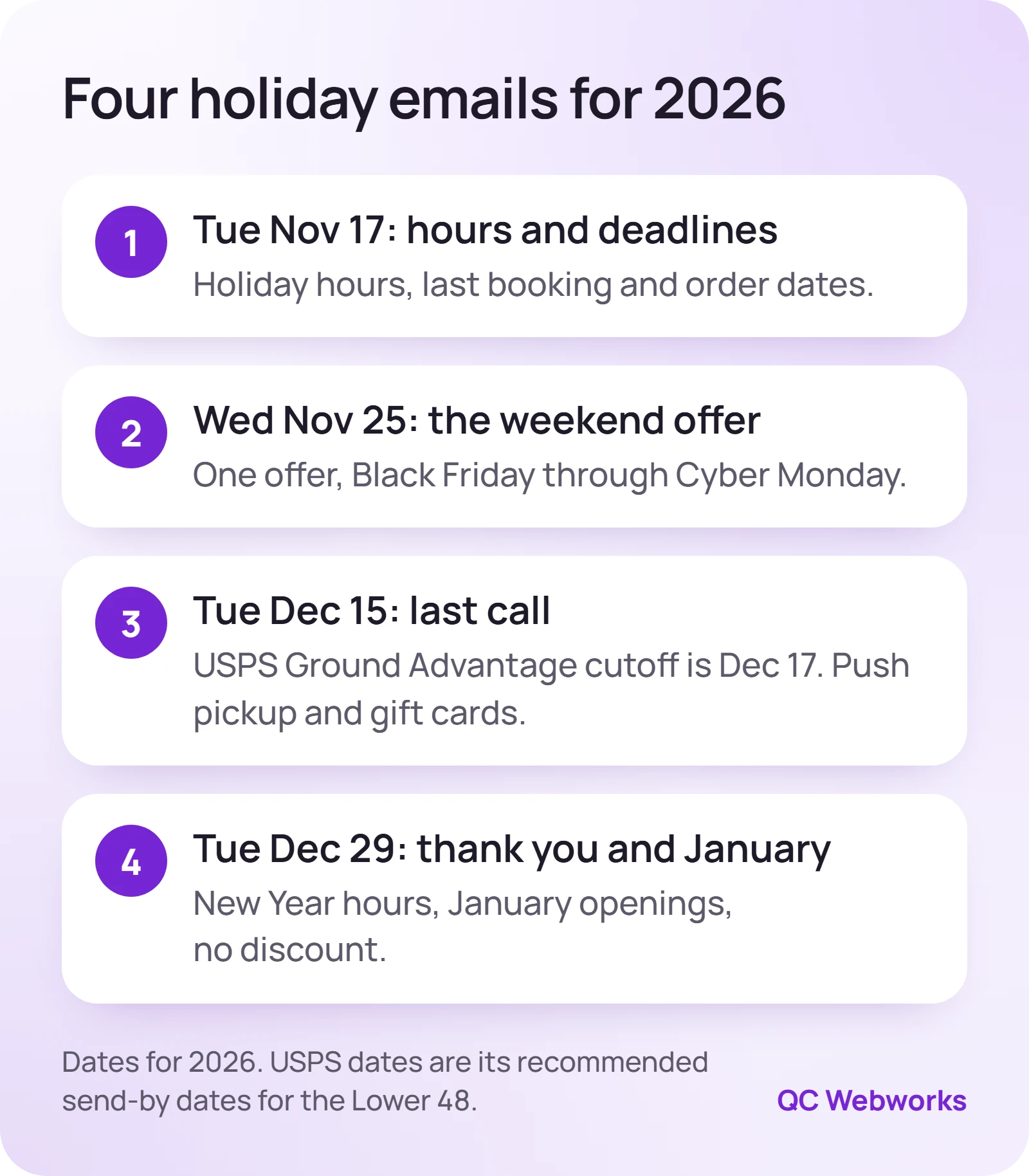
Work backward from those and four emails fall out naturally:
- Tue, Nov 17
Hours and deadlines. The email people save. No discount needed.
- Wed, Nov 25
The weekend offer, sent before people leave for Thanksgiving, good Friday through Monday.
- Tue, Dec 15
Last call: two days before the Ground Advantage cutoff, plus local pickup and gift cards for everyone after it.
- Tue, Dec 29
Thank you, New Year hours and the first January openings.
Retailers with real gift products can add an optional fifth email around December 8: three to six gifts at different prices, each linked to a product page or a “call to hold it” line. Service businesses usually should not. A fifth email with nothing new in it is how lists start unsubscribing.
What goes in each of the four emails
Email 1: hours and deadlines (November 17)
This is the email customers forward to their spouse. Put the useful facts at the top, in plain text, not in an image: your Thanksgiving, Christmas Eve, Christmas, New Year’s Eve and New Year’s Day hours; the last day to book an appointment, place a custom order or schedule an install before the holiday; and a link to buy a gift card. Match the hours to what you set in Google so customers do not see two answers.
Email 2: one weekend offer (November 25)
One offer, one button, one deadline. Wednesday morning beats Friday because it lands before the inbox fills with national Black Friday mail, and it reaches people while they are still planning the weekend. Good offers for local businesses are ones that do not train customers to wait for a sale: a bonus gift card with a purchase, a booked January service at this year’s price, or a free add-on.
Email 3: last call (December 15)
Give a real reason with a real date: “Order by Thursday, December 17 to ship for Christmas,” “Three appointments left before the 24th,” or “Pickup at the counter through noon on the 24th.” Your advantage over national brands shows here. After their shipping cutoffs, a local business can still offer pickup, delivery across town or an e‑gift card that arrives in seconds.
Email 4: thank you and January (December 29)
Skip the discount. Thank people, list New Year’s Eve and New Year’s Day hours, and open January bookings. January is slow for many local businesses, and the customers who just bought from you are the easiest ones to fill it with.
| Send | Subject line example | One link goes to |
|---|---|---|
| Nov 17 | Our holiday hours, and the last day to book | Hours page or booking page |
| Nov 25 | This weekend only: $20 bonus with a $100 gift card | Gift card or offer page |
| Dec 15 | Order by Thursday to ship for Christmas | Shop, pickup or e‑gift card page |
| Dec 29 | Thank you, plus our New Year hours | January booking page |
The offers in the table are illustrative. Use your own numbers, and make the subject line say exactly what is inside. Put the useful words first, because phones cut long subject lines off.
How do I keep holiday emails out of spam?
Inbox providers decide where your email goes based mostly on how people react to it and whether your domain is set up to prove the mail is yours. December raises the stakes because everyone is sending more, and a list you have ignored since last year is the one most likely to hit the spam button.
Google’s email sender guidelines require every sender to Gmail to use SPF or DKIM, and senders of more than 5,000 messages a day to Gmail accounts to use SPF, DKIM and DMARC plus one-click unsubscribe. They also ask you to keep your reported spam rate below 0.10% and never reach 0.30%. Yahoo’s sender best practices set the same 0.3% ceiling and ask bulk senders to honor unsubscribes within two days.
Most local businesses never hit 5,000 a day, but the spam-rate math still applies, and it is unforgiving. Illustrative numbers: on a 1,000-person list, 0.3% is three people clicking “Report spam” on one email. On a 400-person list it is barely more than one.
- Authenticate your domain. Turn on DKIM inside your email platform and check SPF and DMARC. Our SPF, DKIM and DMARC audit walks through it sender by sender.
- Mail people who asked. Customers who opted in, or bought from you and were told they would hear from you. Not a purchased list, not a stack of business cards from a trade show.
- Trim the dead weight. If someone has not opened or clicked in a year, send the first holiday email to engaged subscribers only, or skip the cold ones entirely.
- Send from your own domain. Use hello@yourbusiness.com, not a Gmail or Yahoo address, through your email platform.
- Keep the unsubscribe link easy to find. A person who cannot find it reaches for “Report spam” instead, which is the outcome you are trying to avoid.
Watch the first send. Check the unsubscribe and complaint numbers in your platform a day after the November 17 email. If complaints are visibly higher than usual, cut the list to recent customers before the weekend offer goes out.
The legal minimum for a holiday promo email
The FTC’s CAN-SPAM compliance guide is short and worth ten minutes. For a commercial email it requires a subject line that reflects the content, a clear statement that the message is an advertisement, your valid physical postal address, and a clear way to opt out. You have 10 business days to honor an opt-out, and the opt-out has to keep working for at least 30 days after you send. Each email in violation can cost up to $53,088.
Mainstream email platforms add the address and unsubscribe link to the footer for you. The part you control is the subject line. “Last chance!” on an email that is not a last chance is the kind of line the FTC guide is talking about.
Which offer should a service business send?
Shops have obvious holiday offers. Service businesses have to think a little harder, and the wrong discount can leave you working January at a loss.
If your calendar is full in December
Sell gift cards and January bookings, not December discounts. A bonus gift card (“buy $100, get a $20 card for yourself”) rewards the buyer without discounting work you are already booked for.
If December is slow for you
Offer a dated reason to book now: a free add-on with appointments booked by December 18, or year-end pricing before a January price change you are actually making.
If you sell products and ship
Lead with the deadline, not the discount. The December 17 Ground Advantage date sells more than another 10% off, and pickup covers everyone after it.
If you do quotes or estimates
Use the list to remind people with open quotes that this year’s pricing ends December 31, then follow up one to one. Our quote follow up email plan shows the wording.
How to tell which holiday email made money
Open rates are a poor yardstick now, because some mail apps load images automatically and inflate them. Count clicks, bookings, gift card sales and redemptions instead.
- Tag every link
Add utm_source=newsletter, utm_medium=email and a different utm_campaign for each send, such as holiday26-hours and holiday26-weekend. Google Analytics’ campaign URL help covers the three required parameters. It worked if the campaign names show up under Traffic acquisition with the Session campaign dimension.
- Give in-store offers a code
Use a different code for each send that carries an offer, such as WEEKEND26 and LASTCALL26, and have staff type it into the register. Monday tells you which email brought people through the door.
- Write down four numbers per send
Delivered, clicks, unsubscribes and sales or bookings. Keep them in one sheet. Next November that sheet is your plan.
https://yourbusiness.com/gift-cards/
?utm_source=newsletter
&utm_medium=email
&utm_campaign=holiday26-weekend
The line breaks are only there to make it readable. In the email it is one unbroken link.
Do you need a new email platform before the holidays?
Almost never in November. Switching means exporting the list, re-authenticating your domain and rebuilding forms, and a new sending setup with no history is the last thing you want during the busiest inbox weeks of the year. Send this season from what you have. If the free plan limits are what is pinching, our comparison of Mailchimp alternatives after the free plan cut is a January project.
If you would rather hand the whole thing off, our email marketing service starts at $450 a month and covers the plan, the writing, the setup and the reporting.
Your next step today: open a calendar, block an hour this week for the November 17 email, and write down your holiday hours and last booking dates. Once those exist, the other three emails are mostly filling in the blanks.
Frequently asked questions
How many holiday emails should a small business send?
Four is enough for most local businesses: hours and deadlines, a weekend offer, a last call and a thank-you. Retailers with gift products can add a fifth around December 8. If your list usually hears from you a few times a year, keep it to one email a week at most.
When should I start holiday email marketing in 2026?
Plan it in the first half of November and send the first email around November 17, before Thanksgiving week. That gives customers your hours and deadlines while they are still planning, and it gets a normal-sized send through the inbox before the heavy Black Friday weeks.
Should I send an email on Thanksgiving Day or Black Friday?
Usually not, for a local business. Your email competes with every national brand that day. Sending the offer on Wednesday, November 25, gives it a quieter inbox, and a short reminder on Saturday the 28th to people who clicked but did not buy is fine if the offer is still running.
Can I email customers who never signed up for my list?
CAN-SPAM itself is an opt-out law, but most email platforms require permission in their terms, and cold contacts are the ones who report spam. Stick to people who opted in or bought from you and were told they would hear from you.