
Mailchimp vs Constant Contact: which is better for a small business?
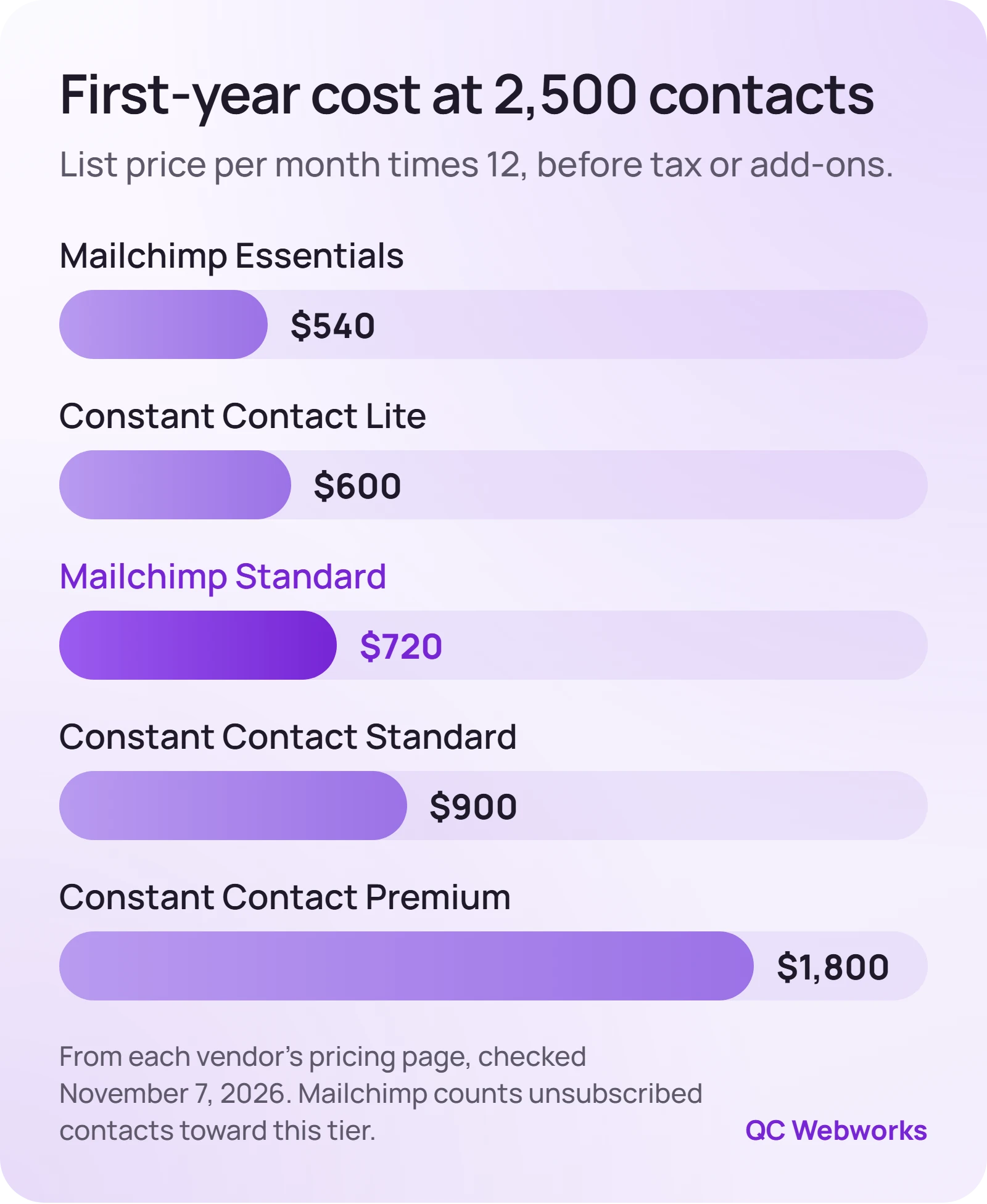
For most small businesses, Mailchimp costs less on monthly billing at every list size from 1,000 to 5,000 contacts and gives you more automation per dollar. Constant Contact earns its higher price if you want live phone support and event tools on its cheapest plan. At 2,500 contacts, the entry plans run $45 and $50 a month.
Most comparisons of these two tools were written years ago and still quote prices and free plan limits that no longer exist. The one number that decides it for a local business is what you will pay at your list size, and neither vendor makes that easy to see. Mailchimp hides it behind a dropdown. Constant Contact puts it in a pop-up table.
We pulled both pricing pages on November 7, 2026, priced every plan at 500, 1,000, 2,500 and 5,000 contacts, and read the billing rules that quietly move you into a more expensive tier. Here is what that looks like, and which one we would pick for which kind of business.
Mailchimp vs Constant Contact pricing at real list sizes
Both tools price by contact count, and both show a low “starting at” price that only applies to the smallest tier. The table below is the list price per month at each size, paid monthly, from Mailchimp’s pricing page and the fee schedule on Constant Contact’s pricing page. It leaves out Mailchimp Premium, which starts at $350 a month for 10,000 contacts and is built for larger teams.
| Plan | 500 contacts | 1,000 | 2,500 | 5,000 |
|---|---|---|---|---|
| Mailchimp Essentials | $13 | $26.50 | $45 | $75 |
| Mailchimp Standard | $20 | $45 | $60 | $100 |
| Constant Contact Lite | $12 | $30 | $50 | $80 |
| Constant Contact Standard | $35 | $55 | $75 | $110 |
| Constant Contact Premium | $80 | $110 | $150 | $200 |
One thing the table does not show: Constant Contact takes up to 15% off if you prepay for a year, while Mailchimp’s 15% discount only starts at 10,000 contacts. That can flip the order. Prepaid at the full 15%, Constant Contact Lite at 2,500 contacts works out to $42.50 a month against $45 for Mailchimp Essentials, and Constant Contact Standard at 5,000 to $93.50 against $100. If you would prepay, run that math on your own tier.
The tier breaks that change your bill
The two vendors draw their tiers in different places, and that matters more than the starting price. Constant Contact’s second tier covers 501 to 1,000 contacts and the third starts at 1,001. Mailchimp’s second tier runs all the way from 501 to 1,500.
Take an illustrative list of 1,200 contacts. On Mailchimp that is still the second tier: $26.50 a month on Essentials or $45 on Standard. On Constant Contact it is the 1,001 to 2,500 tier: $50 on Lite or $75 on Standard. Comparing the two Standard plans, that is $30 a month, or $360 a year, for the same list.
Unsubscribed contacts count on Mailchimp
This is the billing rule owners trip over. Mailchimp’s help article on its plans says subscribed, unsubscribed and non-subscribed contacts all count toward your contact total. Cleaned (bounced), pending, archived and deleted contacts do not.
Check this before you compare. Illustrative: 2,300 subscribers plus 400 old unsubscribes is 2,700 billable contacts on Mailchimp. That lands in the 2,501 to 5,000 tier, so Essentials costs $75 a month instead of $45. Archiving the unsubscribed contacts brings you back under 2,500.
Constant Contact’s pricing page says its price is based on contacts and email sends. If your list has a long tail of unsubscribes, ask its sales team how they are counted before you treat the table above as your number.
What each plan lets you send
Both tools tie your monthly send limit to your contact tier. You will not hit these with a weekly newsletter, but they matter if you send a lot of promotions.
- Mailchimp Essentials and Constant Contact Lite: 10 times your contact tier each month.
- Mailchimp Standard and Constant Contact Standard: 12 times your contact tier.
- Premium plans: 15 times on Mailchimp and 24 times on Constant Contact.
- Going over: Constant Contact charges $0.002 per extra send, which is $2 per 1,000. Mailchimp’s paid plans bill overages automatically and keep sending.
- Free plan: Mailchimp’s caps at 250 contacts and 500 sends a month, and sending pauses if you go over. Constant Contact’s pricing page lists no free plan; it offers a full refund if you cancel within 30 days.
Automation, segments and support compared
Price per contact is close enough at the low end that what you get for it decides the rest. These are the plan details as each vendor lists them.
Mailchimp
Best for owners who want automation without a big monthly bill
- Essentials: automations up to 4 steps, 3 users
- Standard: up to 200 automation flows, 5 users
- 24/7 email and chat support on paid plans
- Phone support only on Premium ($350 a month and up)
- Free plan up to 250 contacts
Constant Contact
Best for owners who want a person on the phone
- Lite: 1 automation template, 1 custom segment
- Standard: 3 automation templates, resend to non-openers, 10 segments
- Premium: custom automations and auto-send welcome emails
- Live phone and chat support on every plan
- Event registration and payments on every plan
The line that surprised us: on Constant Contact’s comparison table, custom automations and the auto-send welcome email sit in the Premium column. If a welcome series is the reason you want email at all, price Constant Contact at Premium ($110 a month at 1,000 contacts), not Lite. On Mailchimp, a multi-step welcome series fits on Standard at $45.
A welcome series is not the only flow worth building. If you send quotes, the automation that pays for itself fastest is usually the follow-up, which we lay out in our quote follow-up email plan.
Deliverability: what neither platform does for you
Constant Contact advertises a 98% inbox rate, citing a 2025 test by Validity. Neither vendor’s headline number tells you where your emails will land, because the biggest factor is your own domain.
Google’s email sender guidelines require every sender to set up SPF or DKIM and keep spam complaints under 0.3%. Anyone sending more than 5,000 messages a day to Gmail also needs SPF, DKIM and DMARC, plus one-click unsubscribe. Both platforms walk you through adding the DNS records. If you are not sure yours are right, our SPF, DKIM and DMARC audit shows how to check them in a few minutes.
Which one should a small business pick?
If you have under 250 contacts and send a simple newsletter
Then start on Mailchimp’s free plan and move up when you outgrow it.
If you want a welcome series, quote follow-up or other automation
Then Mailchimp Standard. It covers multi-step flows for less than Constant Contact’s plan that includes them.
If nobody on your team wants to learn software and you want to call someone
Then Constant Contact Lite or Standard. Phone support on the cheapest plan is the real reason to pay more.
If you run ticketed events, classes or workshops
Then look hard at Constant Contact, which includes event registration and payments on every plan.
If neither fits, the field is wider than these two. Our comparison of Mailchimp alternatives covers MailerLite, EmailOctopus, Brevo and ActiveCampaign, several of which cost less again.
How to switch without losing subscribers
- Export everything, including unsubscribes
Export your full contact list as a CSV, with unsubscribed contacts in a separate file. Import those as unsubscribed on the new platform so nobody who opted out gets emailed again.
- Authenticate the new sender before the first send
Add the new platform’s DNS records and confirm they pass in its domain settings. You know it worked when the platform shows your domain as verified.
- Rebuild your automations, then move the forms
Recreate the welcome email or follow-up flow and test it with your own address. Only then swap the signup form on your website, so no new subscriber falls into a gap.
- Send one plain email from the new account
A short note saying who you are and what to expect. It warms up the new sender and clears out dead addresses early.
If it is the holidays when you switch, settle the platform first and build the season’s sends second. Our holiday email marketing plan lays out four sends that work on either tool.
Our take on Mailchimp vs Constant Contact
For a typical local business with 1,000 to 5,000 contacts, Mailchimp Standard is the better value: more automation, more users and a lower monthly price at every size we checked. Constant Contact is the right call for an owner who will actually use the phone support, or who runs events. Pick on that, not on template counts.
The platform fee is the smallest part of the job. Writing, designing and sending something people open every month is where the time goes. If you would rather hand that off, our email marketing service starts from $450 a month, works on either platform, and leaves the list in your account.
Your next step: count your contacts the way each vendor bills them, including Mailchimp’s unsubscribes, and price both at that number this week before you renew or switch.
Frequently asked questions
Is Constant Contact cheaper than Mailchimp?
At 500 contacts, Constant Contact Lite is $12 a month against $13 for Mailchimp Essentials. From 1,000 to 5,000 contacts, Mailchimp’s matching plans cost less on monthly billing at every size we checked. Prepaying a year with Constant Contact saves up to 15%, which can put some of its tiers below Mailchimp’s monthly price.
Does Mailchimp still have a free plan?
Yes, but it is small. Mailchimp’s free plan allows 250 contacts and 500 sends a month, and sending pauses if you go over either limit. Constant Contact’s pricing page lists no free plan, only a 30-day money-back guarantee.
Which is easier to use, Mailchimp or Constant Contact?
Both use drag-and-drop email editors with ready-made templates. Our view is that the bigger difference is help, not the editor: Constant Contact puts a person on the phone on every plan, and Mailchimp keeps phone support for Premium.
Do unsubscribed contacts count toward my bill?
On Mailchimp, yes. Its help docs say unsubscribed contacts count toward your contact total, while archived, cleaned and deleted ones do not. Archive old unsubscribes before you check which tier you are in.